SSH SSH客户端 可连接运行了 SSH服务器 的远程主机
SSH协议:专为远程登录会话和其他网络服务提供安全性的协议。建立在应用层和传输层基础上的安全协议
连接 通过SSH协议防止远程登录过程的信息泄露
| 命令 | 对应英文 | 作用 |
1
2
3
4
5
6
7
8
ssh [-p port] user@remote Ip # user:远程机器上的用户名,不指定的话默认当前用户 # remote:远程机器ip,可以是 ip/域名,或者别名 # port:SSH 服务器进程监听的端口,不指定,默认是22 ssh -p 22 Amos@172.16.140.133 exit #退出当前用户
Windows若想ssh连接到Linux,则需要安装相应的客户端
对所有传输的数据进行加密,防止DNS与IP欺骗
| 选项 | 含义 |
1
2
3
4
5
6
7
8
# 将本地当前目录下的 01.py 复制到远程家目录下的 Desktop/01.py scp -P port 01.py user@remote:Desktop/01.py # 把远程家目录下的 Desktop/01.py 文件复制到本地当前目录下的 01.py scp -P port user@remote:Desktop/01.py 01.py # 加上-r 传输文件夹 scp -r demo user@remote:Desktop
免密登录 在本地 .ssh 文件夹下登录远程服务器,保存SSH相关的配置信息
生成本地当前用户公钥
执行 ssh-keygen 即可生成SSH公钥,全部回车 id_rsa.pub :即本机公钥id_rsa :即本机私钥将公钥上传到服务器
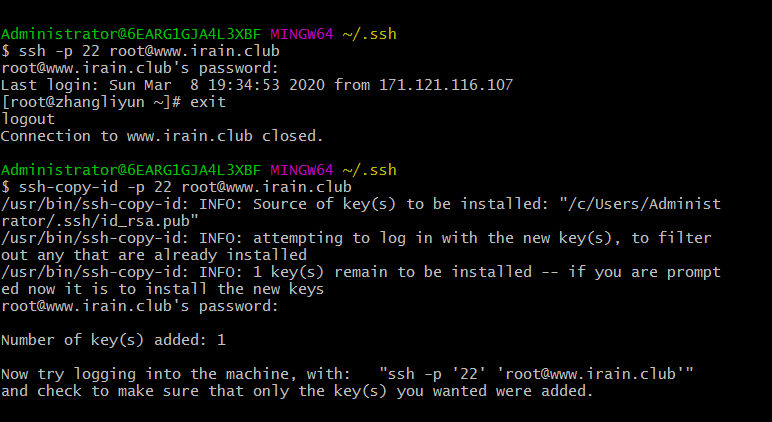
执行 ssh-copy-id -p port user@remote ,让远程服务器记住公钥
工作原理 :非对称加密算法
使用 公钥 加密的数据,需要私钥解密私钥 加密的数据,需要公钥解密
本地发送的数据,用私钥加密 服务器若保存有公钥,会对数据解密 数据处理完后用公钥加密,回传给本地 ssh配置别名 输入 ssh username@ipaddress 很繁琐~/.ssh/config 里追加以下内容
1
2
3
4
Host newName HostName ip_address User username Port port
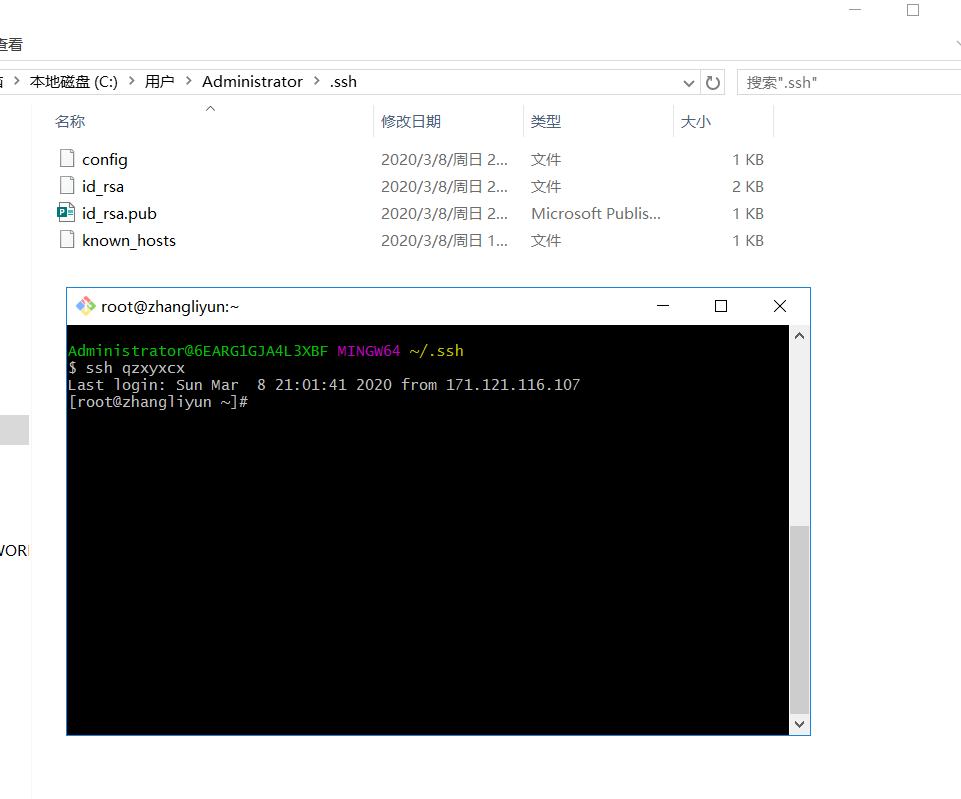
保存之后,就可使用别名登录
Webserver http.tar.gz 是用C语言编程的一个简单版webserver
1
2
3
4
5
6
7
8
9
10
11
12
13
14
15
16
17
18
19
20
21
22
23
24
25
26
27
28
29
30
31
32
33
34
35
36
37
38
39
40
41
42
43
44
45
46
47
48
49
50
51
52
53
54
55
56
57
58
59
60
61
62
63
64
65
66
67
68
69
70
71
72
73
74
75
76
77
78
79
80
81
82
83
84
85
86
87
88
89
90
91
92
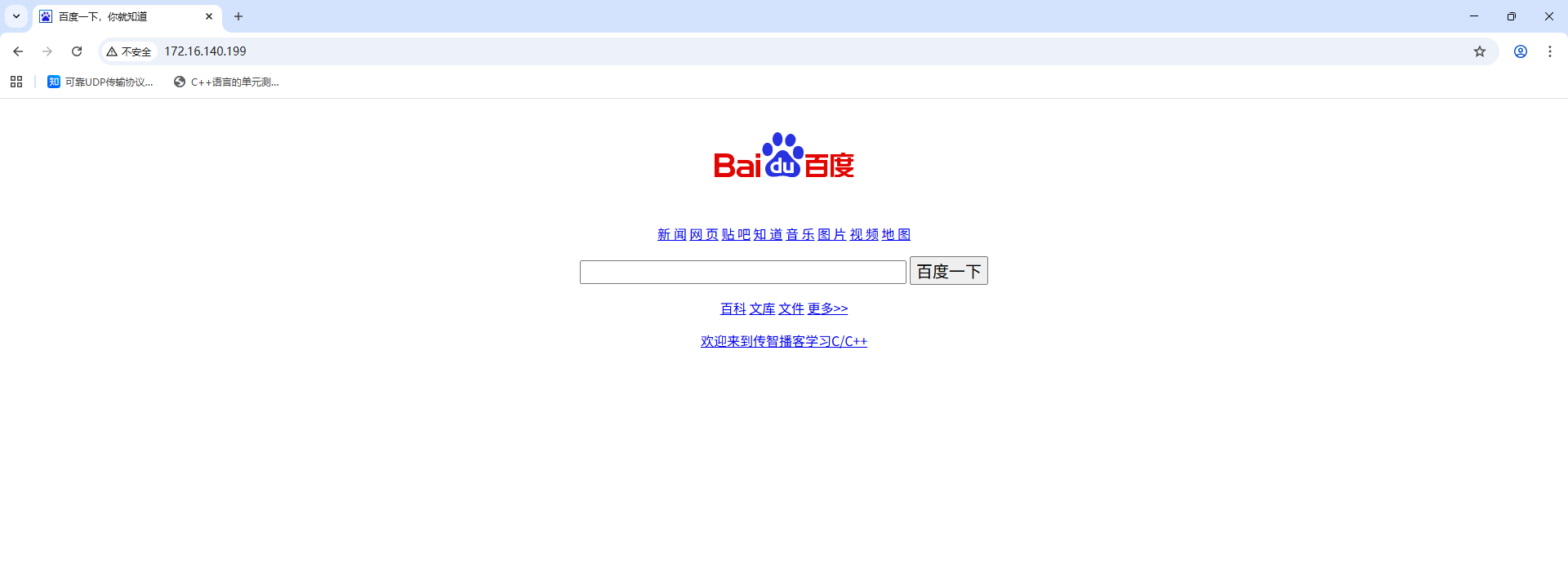
# 将http.tar.gz拷贝到服务端,并解压 root@tzj-virtual-machine:/opt# tar -xzvf http.tar.gz http/ http/success.html http/images/ http/images/MC_icon_white.png http/images/tit.jpg http/images/logo.jpg http/images/11.jpg http/images/mail.jpg http/images/MC_icon.png http/images/pop_close.png http/images/conterpic3.jpg http/images/bdlogo.gif http/images/QR1.jpg http/images/QR2.jpg http/default.html http/data.txt http/makefile http/jquery-1.11.1.min.js http/myhttp http/css/ http/css/style.css http/src/ http/src/useradd.c http/src/work.h http/src/pub.c http/src/s.c http/src/server.c http/src/work.c http/src/pub.h http/src/pass.c http/index.html http/favicon.ico http/error.html http/templet.zhujy http/postfile.html # 进入解压目录,编译源码 root@tzj-virtual-machine:/opt# cd http/ root@tzj-virtual-machine:/opt/http# ls css default.html favicon.ico index.html makefile postfile.html success.html data.txt error.html images jquery-1.11.1.min.js myhttp src templet.zhujy root@tzj-virtual-machine:/opt/http# make # 关闭防火墙 root@tzj-virtual-machine:/opt/http# systemctl status ufw ● ufw.service - Uncomplicated firewall Loaded: loaded (/lib/systemd/system/ufw.service; enabled; vendor preset: enabled) Active: active (exited) since Sun 2025-09-28 18:24:44 CST; 1 week 4 days ago Docs: man:ufw(8) Main PID: 676 (code=exited, status=0/SUCCESS) CPU: 72ms 9月 28 18:24:42 tzj-virtual-machine systemd[1]: Starting Uncomplicated firewall... 9月 28 18:24:44 tzj-virtual-machine systemd[1]: Finished Uncomplicated firewall. root@tzj-virtual-machine:/opt/http# systemctl stop ufw root@tzj-virtual-machine:/opt/http# systemctl disable ufw Synchronizing state of ufw.service with SysV service script with /lib/systemd/systemd-sysv-install. Executing: /lib/systemd/systemd-sysv-install disable ufw Removed /etc/systemd/system/multi-user.target.wants/ufw.service. # root用户启动或关闭web服务 root@tzj-virtual-machine:/opt/http# ./myhttp stop signal SIGTERM myhttp end root@tzj-virtual-machine:/opt/http# ./myhttp start listen 80 success myhttp begin root@tzj-virtual-machine:/opt/http# ./myhttp start listen 80 success myhttp begin root@tzj-virtual-machine:/opt/http# ifconfig ens33: flags=4163<UP,BROADCAST,RUNNING,MULTICAST> mtu 1500 inet 172.16.140.199 netmask 255.255.255.0 broadcast 172.16.140.255 ether 00:0c:29:e5:2a:4c txqueuelen 1000 (Ethernet) RX packets 86878 bytes 82336775 (82.3 MB) RX errors 0 dropped 0 overruns 0 frame 0 TX packets 42514 bytes 11662099 (11.6 MB) TX errors 0 dropped 0 overruns 0 carrier 0 collisions 0 lo: flags=73<UP,LOOPBACK,RUNNING> mtu 65536 inet 127.0.0.1 netmask 255.0.0.0 inet6 ::1 prefixlen 128 scopeid 0x10<host> loop txqueuelen 1000 (Local Loopback) RX packets 62266 bytes 14774523 (14.7 MB) RX errors 0 dropped 0 overruns 0 frame 0 TX packets 62266 bytes 14774523 (14.7 MB) TX errors 0 dropped 0 overruns 0 carrier 0 collisions 0 # 访问,启动成功
修改输出内容
1
2
3
4
5
6
7
8
9
10
11
12
13
14
15
16
17
18
19
20
21
22
23
24
25
26
27
28
29
30
31
32
33
34
35
36
37
38
39
40
41
42
43
44
45
46
47
48
49
50
51
52
53
54
55
56
57
58
59
60
root@tzj-virtual-machine:/opt/http# vim hello.c # include <stdio.h> int main() { printf("hello world\n"); return 0; } # 编译 root@tzj-virtual-machine:/opt/http# gcc hello.c -o hello.cgi # 启动http root@tzj-virtual-machine:/opt/http# ./myhttp start listen 80 success myhttp begin # root@tzj-virtual-machine:/opt/http# ./myhttp start listen 80 success myhttp begin root@tzj-virtual-machine:/opt/http# accept by 172.16.140.1 thread is begin recv: GET /hello.cgi HTTP/1.1 Host: 172.16.140.199 Connection: keep-alive Cache-Control: max-age=0 Upgrade-Insecure-Requests: 1 User-Agent: Mozilla/5.0 (Windows NT 10.0; Win64; x64) AppleWebKit/537.36 (KHTML, like Gecko) Chrome/140.0.0.0 Safari/537.36 Accept: text/html,application/xhtml+xml,application/xml;q=0.9,image/avif,image/webp,image/apng,*/*;q=0.8,application/signed-exchange;v=b3;q=0.7 Accept-Encoding: gzip, deflate Accept-Language: zh-CN,zh;q=0.9 accept by 172.16.140.1 thread is begin headbuf: HTTP/1.1 200 OK Content-Type: text/html Content-Length:12 thread_is end recv: GET /favicon.ico HTTP/1.1 Host: 172.16.140.199 Connection: keep-alive User-Agent: Mozilla/5.0 (Windows NT 10.0; Win64; x64) AppleWebKit/537.36 (KHTML, like Gecko) Chrome/140.0.0.0 Safari/537.36 Accept: image/avif,image/webp,image/apng,image/svg+xml,image/*,*/*;q=0.8 Referer: http://172.16.140.199/hello.cgi Accept-Encoding: gzip, deflate Accept-Language: zh-CN,zh;q=0.9 headbuf: HTTP/1.1 200 OK Content-Type: image/x-icon Content-Length:2550 thread_is end
中文乱码 :Linux默认采用的编码格式是UTF-8,浏览器显示默认采用的编码格式是GBK
直接修改浏览器编码
在输头部信息中指定编码格式,
1
2
3
4
5
6
7
8
9
10
11
12
13
14
15
16
17
root@tzj-virtual-machine:/opt/http# vim ceshi.c # include <stdio.h> int main() { printf("<head>"); printf("<meta http-equiv=\"content-type\" content=\"text/html;charset=utf-8\">"); printf("</head>"); printf("<html>"); printf("测试\n"); printf("</html>"); return 0; } root@tzj-virtual-machine:/opt/http# gcc ceshi.c -o ceshi.cgi
ADB 安卓调试工具(Android Debug Bridge,ADB),PC端与安卓手机的通道,管理手机设备或模拟器的状态
Windows配置ADB环境 1 2 3 4 5 6 7 8 9 10 11 12 13 14 15 16 17 18 19 20 21 22 23 24 25 26 27 28 29 30 31 # 将abd.exe添加到环境变量 D:\deps\platform-tools # 测试abd命令 C:\Users\tian_zj>adb Android Debug Bridge version 1.0.31 -a - directs adb to listen on all interfaces for a connection -d - directs command to the only connected USB device returns an error if more than one USB device is present. -e - directs command to the only running emulator. returns an error if more than one emulator is running. -s <specific device> - directs command to the device or emulator with the given serial number or qualifier. Overrides ANDROID_SERIAL environment variable. -p <product name or path> - simple product name like 'sooner', or a relative/absolute path to a product out directory like 'out/target/product/sooner'. If -p is not specified, the ANDROID_PRODUCT_OUT environment variable is used, which must be an absolute path. -H - Name of adb server host (default: localhost) -P - Port of adb server (default: 5037) devices [-l] - list all connected devices ('-l' will also list device qualifiers) connect <host>[:<port>] - connect to a device via TCP/IP Port 5555 is used by default if no port number is specified. disconnect [<host>[:<port>]] - disconnect from a TCP/IP device. Port 5555 is used by default if no port number is specified. Using this command with no additional arguments will disconnect from all connected TCP/IP devices.
将Android设备通过USB连接到PC
1
2
3
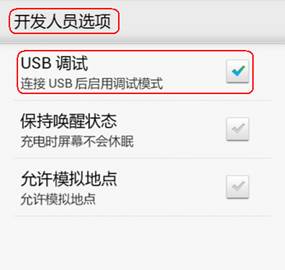
# 将Android设备通过USB连接到PC,安装相应驱动 # Android设备启动USB调试功能
1
2
3
4
C:\Users\tian_zj>adb devices * daemon not running. starting it now on port 5037 * * daemon started successfully * List of devices attached