0%

Webserver

http.tar.gz 是用C语言编程的一个简单版webserver

1
2
3
4
5
6
7
8
9
10
11
12
13
14
15
16
17
18
19
20
21
22
23
24
25
26
27
28
29
30
31
32
33
34
35
36
37
38
39
40
41
42
43
44
45
46
47
48
49
50
51
52
53
54
55
56
57
58
59
60
61
62
63
64
65
66
67
68
69
70
71
72
73
74
75
76
77
78
79
80
81
82
83
84
85
86
87
88
89
90
91
92
# 将http.tar.gz拷贝到服务端,并解压
root@tzj-virtual-machine:/opt# tar -xzvf http.tar.gz
http/
http/success.html
http/images/
http/images/MC_icon_white.png
http/images/tit.jpg
http/images/logo.jpg
http/images/11.jpg
http/images/mail.jpg
http/images/MC_icon.png
http/images/pop_close.png
http/images/conterpic3.jpg
http/images/bdlogo.gif
http/images/QR1.jpg
http/images/QR2.jpg
http/default.html
http/data.txt
http/makefile
http/jquery-1.11.1.min.js
http/myhttp
http/css/
http/css/style.css
http/src/
http/src/useradd.c
http/src/work.h
http/src/pub.c
http/src/s.c
http/src/server.c
http/src/work.c
http/src/pub.h
http/src/pass.c
http/index.html
http/favicon.ico
http/error.html
http/templet.zhujy
http/postfile.html

# 进入解压目录,编译源码
root@tzj-virtual-machine:/opt# cd http/
root@tzj-virtual-machine:/opt/http# ls
css default.html favicon.ico index.html makefile postfile.html success.html
data.txt error.html images jquery-1.11.1.min.js myhttp src templet.zhujy
root@tzj-virtual-machine:/opt/http# make

# 关闭防火墙
root@tzj-virtual-machine:/opt/http# systemctl status ufw
● ufw.service - Uncomplicated firewall
Loaded: loaded (/lib/systemd/system/ufw.service; enabled; vendor preset: enabled)
Active: active (exited) since Sun 2025-09-28 18:24:44 CST; 1 week 4 days ago
Docs: man:ufw(8)
Main PID: 676 (code=exited, status=0/SUCCESS)
CPU: 72ms

9月 28 18:24:42 tzj-virtual-machine systemd[1]: Starting Uncomplicated firewall...
9月 28 18:24:44 tzj-virtual-machine systemd[1]: Finished Uncomplicated firewall.
root@tzj-virtual-machine:/opt/http# systemctl stop ufw
root@tzj-virtual-machine:/opt/http# systemctl disable ufw
Synchronizing state of ufw.service with SysV service script with /lib/systemd/systemd-sysv-install.
Executing: /lib/systemd/systemd-sysv-install disable ufw
Removed /etc/systemd/system/multi-user.target.wants/ufw.service.

# root用户启动或关闭web服务
root@tzj-virtual-machine:/opt/http# ./myhttp stop
signal SIGTERM
myhttp end

root@tzj-virtual-machine:/opt/http# ./myhttp start
listen 80 success
myhttp begin

root@tzj-virtual-machine:/opt/http# ./myhttp start
listen 80 success
myhttp begin
root@tzj-virtual-machine:/opt/http# ifconfig
ens33: flags=4163<UP,BROADCAST,RUNNING,MULTICAST> mtu 1500
inet 172.16.140.199 netmask 255.255.255.0 broadcast 172.16.140.255
ether 00:0c:29:e5:2a:4c txqueuelen 1000 (Ethernet)
RX packets 86878 bytes 82336775 (82.3 MB)
RX errors 0 dropped 0 overruns 0 frame 0
TX packets 42514 bytes 11662099 (11.6 MB)
TX errors 0 dropped 0 overruns 0 carrier 0 collisions 0

lo: flags=73<UP,LOOPBACK,RUNNING> mtu 65536
inet 127.0.0.1 netmask 255.0.0.0
inet6 ::1 prefixlen 128 scopeid 0x10<host>
loop txqueuelen 1000 (Local Loopback)
RX packets 62266 bytes 14774523 (14.7 MB)
RX errors 0 dropped 0 overruns 0 frame 0
TX packets 62266 bytes 14774523 (14.7 MB)
TX errors 0 dropped 0 overruns 0 carrier 0 collisions 0
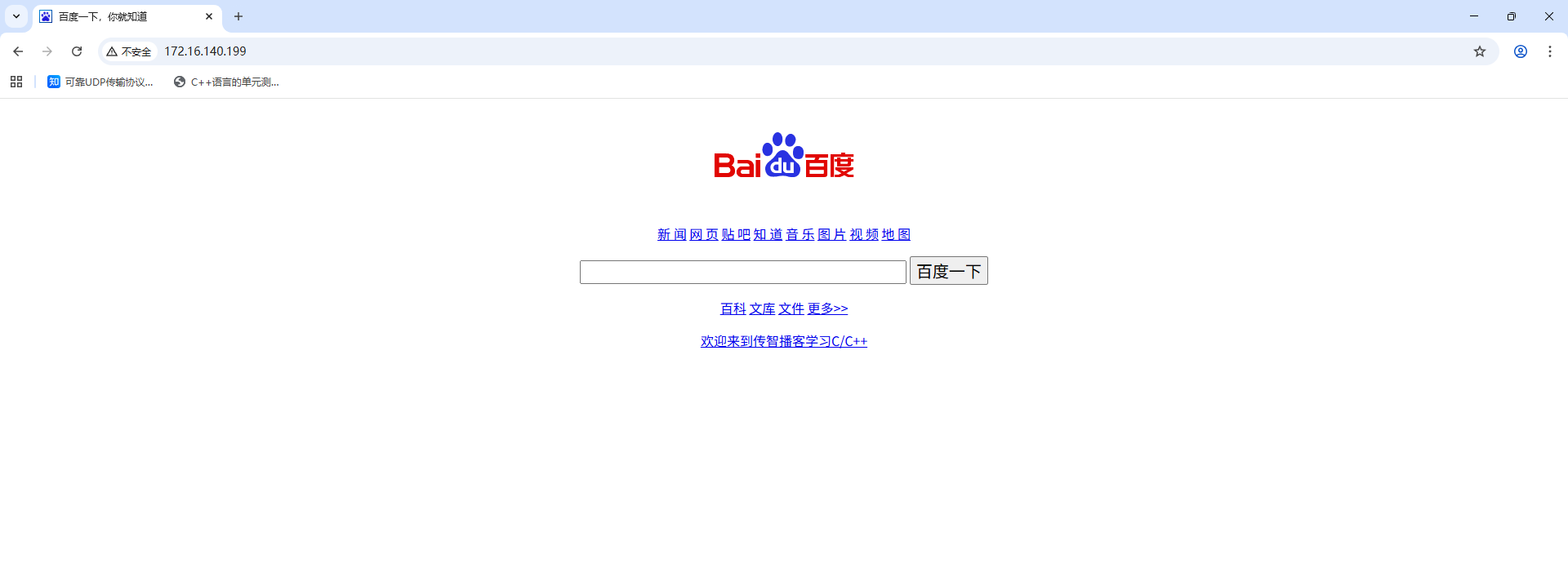
# 访问,启动成功

image-20251009204945796

修改输出内容

1
2
3
4
5
6
7
8
9
10
11
12
13
14
15
16
17
18
19
20
21
22
23
24
25
26
27
28
29
30
31
32
33
34
35
36
37
38
39
40
41
42
43
44
45
46
47
48
49
50
51
52
53
54
55
56
57
58
59
60
root@tzj-virtual-machine:/opt/http# vim hello.c

#include <stdio.h>

int main()
{
printf("hello world\n");

return 0;
}

# 编译
root@tzj-virtual-machine:/opt/http# gcc hello.c -o hello.cgi

# 启动http
root@tzj-virtual-machine:/opt/http# ./myhttp start
listen 80 success
myhttp begin

## 此时,访问http://172.16.140.199/hello.cgi
root@tzj-virtual-machine:/opt/http# ./myhttp start
listen 80 success
myhttp begin
root@tzj-virtual-machine:/opt/http# accept by 172.16.140.1
thread is begin
recv:
GET /hello.cgi HTTP/1.1
Host: 172.16.140.199
Connection: keep-alive
Cache-Control: max-age=0
Upgrade-Insecure-Requests: 1
User-Agent: Mozilla/5.0 (Windows NT 10.0; Win64; x64) AppleWebKit/537.36 (KHTML, like Gecko) Chrome/140.0.0.0 Safari/537.36
Accept: text/html,application/xhtml+xml,application/xml;q=0.9,image/avif,image/webp,image/apng,*/*;q=0.8,application/signed-exchange;v=b3;q=0.7
Accept-Encoding: gzip, deflate
Accept-Language: zh-CN,zh;q=0.9

accept by 172.16.140.1
thread is begin
headbuf:
HTTP/1.1 200 OK
Content-Type: text/html
Content-Length:12

thread_is end
recv:
GET /favicon.ico HTTP/1.1
Host: 172.16.140.199
Connection: keep-alive
User-Agent: Mozilla/5.0 (Windows NT 10.0; Win64; x64) AppleWebKit/537.36 (KHTML, like Gecko) Chrome/140.0.0.0 Safari/537.36
Accept: image/avif,image/webp,image/apng,image/svg+xml,image/*,*/*;q=0.8
Referer: http://172.16.140.199/hello.cgi
Accept-Encoding: gzip, deflate
Accept-Language: zh-CN,zh;q=0.9

headbuf:
HTTP/1.1 200 OK
Content-Type: image/x-icon
Content-Length:2550

thread_is end

image-20251009205450529

中文乱码 :Linux默认采用的编码格式是UTF-8,浏览器显示默认采用的编码格式是GBK

image-20251009205857951

直接修改浏览器编码

在输头部信息中指定编码格式,

1
2
3
4
5
6
7
8
9
10
11
12
13
14
15
16
17
root@tzj-virtual-machine:/opt/http# vim ceshi.c

#include <stdio.h>

int main()
{
printf("<head>");
printf("<meta http-equiv=\"content-type\" content=\"text/html;charset=utf-8\">");
printf("</head>");
printf("<html>");
printf("测试\n");
printf("</html>");

return 0;
}

root@tzj-virtual-machine:/opt/http# gcc ceshi.c -o ceshi.cgi

image-20251009205638155

ADB

安卓调试工具(Android Debug Bridge,ADB),PC端与安卓手机的通道,管理手机设备或模拟器的状态

Windows配置ADB环境

1
2
3
4
5
6
7
8
9
10
11
12
13
14
15
16
17
18
19
20
21
22
23
24
25
26
27
28
29
30
31
# 将abd.exe添加到环境变量
D:\deps\platform-tools

# 测试abd命令
C:\Users\tian_zj>adb
Android Debug Bridge version 1.0.31

-a - directs adb to listen on all interfaces for a connection
-d - directs command to the only connected USB device
returns an error if more than one USB device is present.
-e - directs command to the only running emulator.
returns an error if more than one emulator is running.
-s <specific device> - directs command to the device or emulator with the given
serial number or qualifier. Overrides ANDROID_SERIAL
environment variable.
-p <product name or path> - simple product name like 'sooner', or
a relative/absolute path to a product
out directory like 'out/target/product/sooner'.
If -p is not specified, the ANDROID_PRODUCT_OUT
environment variable is used, which must
be an absolute path.
-H - Name of adb server host (default: localhost)
-P - Port of adb server (default: 5037)
devices [-l] - list all connected devices
('-l' will also list device qualifiers)
connect <host>[:<port>] - connect to a device via TCP/IP
Port 5555 is used by default if no port number is specified.
disconnect [<host>[:<port>]] - disconnect from a TCP/IP device.
Port 5555 is used by default if no port number is specified.
Using this command with no additional arguments
will disconnect from all connected TCP/IP devices.

将Android设备通过USB连接到PC

1
2
3
# 将Android设备通过USB连接到PC,安装相应驱动

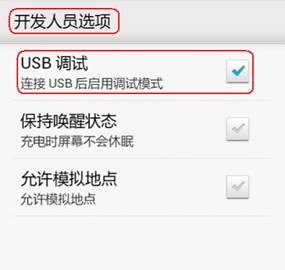
# Android设备启动USB调试功能

2016-05-31_205333

1
2
3
4
C:\Users\tian_zj>adb devices
* daemon not running. starting it now on port 5037 *
* daemon started successfully *
List of devices attached
-------------本文结束-------------